WordPress website loading gibberish text? Here's how to solve it
Tutorials
Let me guess – when you're logged in, your website loads just fine, but when you log out and reload, it looks like a wall of gibberish. That's caused by overlapping compression, most likely between your host's zlib compression and a compression plugin running on your WordPress site.
How to fix this
You'll be surprised how easy this is to fix. The steps below are written for cPanel-era hosting, but the double-compression cause itself can show up on any host, just look for the equivalent setting in your control panel.
Simply:
- Login to your WordPress admin
- Enter the settings page of whatever compression plugin you're using (e.g. I'm using Swift)
- Disable GZip
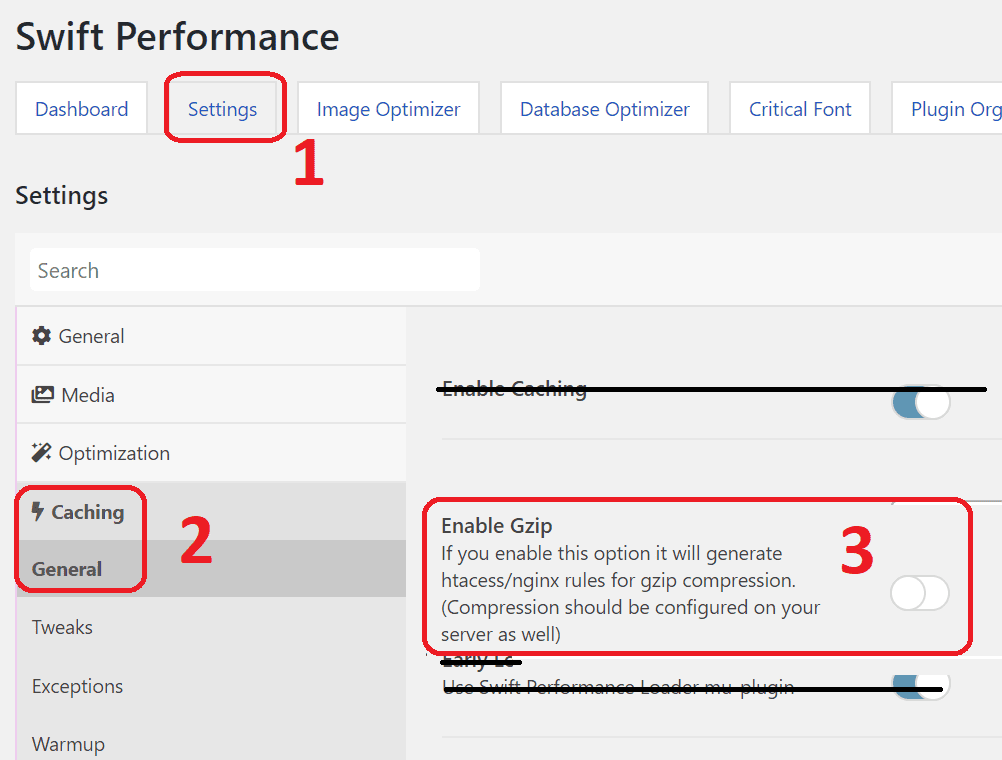
Alternatively, you can disable the one in your cPanel:
- Login to cPanel
- Either:
- Enter the "Optimize Website" page and set it to not compress anything, or
- Enter the PHP Options page and disable zlib_compression
Let me know if it works for you too. If you've got other suggestions, feel free to add them in the comments.
Special thanks to Johnny Nguyen for the fix.