How to Schedule Automatic Server Restarts on your Gridpane Linux server
Tutorials
As tech guys/gals, we know that 99% of tech issues can be solved with a simple device reset. There's no real benefit to leaving a server unrebooted for long periods other than uptime stats (assuming you can afford the few minutes of downtime during the restart, of course). To me, that's reason enough to set an auto-restart every week, just to clear out the bugs and cobwebs that build up.
I use GridPane to manage my servers (which run Ubuntu 22 on my VPS), so this guide is written with that in mind. I believe the steps below apply to any Linux server, though – the crontab approach is the same wherever you're hosted.
Why restart at all
In case you didn't already know this, server restarts are helpful for:
- System health: reboots clear memory, reduce fragmentation, and tidy up whatever's built up in the background.
- Patch management: some updates only take effect after a reboot, so this keeps things patched and stable without you having to remember.
- Performance: handy for anything with heavy resource usage, since it refreshes the services running on the box.
Prerequisites
- Root privileges: you'll need
sudoor root access to edit the crontab configuration. - FTP software: I use WinSCP, but any server file manager with SSH capability should work (you can use plain FTP, but SSH is more secure). Alternatively, you can use the terminal directly – but if you knew how to do that, you wouldn't need this guide in the first place.
How to schedule a weekly restart on Sunday at midnight
Step 1: Open the crontab file
Open your preferred FTP software (I use WinSCP) with root access, navigate to /etc/, and open the crontab file with your text editor.
(This file doesn't have a suffix like .txt – it's just crontab.)
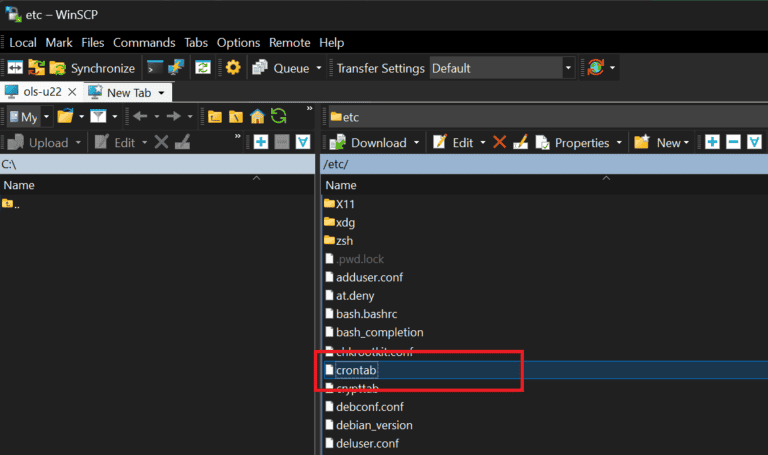
Step 2: Add the restart command
Add the following line at the bottom of the file, then save and exit:
0 0 * * 0 root /sbin/shutdown -r now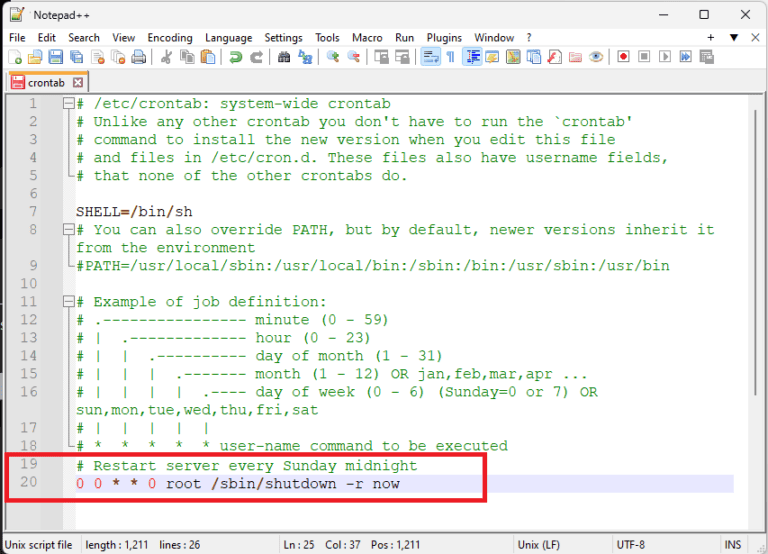
Here are other options you can use:
- Daily at midnight:
0 0 * * * root /sbin/shutdown -r now - Weekly, Monday midnight:
0 0 * * 1 root /sbin/shutdown -r now - Weekly, Tuesday midnight:
0 0 * * 2 root /sbin/shutdown -r now - Weekly, Wednesday midnight:
0 0 * * 3 root /sbin/shutdown -r now - Weekly, Thursday midnight:
0 0 * * 4 root /sbin/shutdown -r now - Weekly, Friday midnight:
0 0 * * 5 root /sbin/shutdown -r now - Weekly, Saturday midnight:
0 0 * * 6 root /sbin/shutdown -r now - Monthly, first of the month at midnight:
0 0 1 * * root /sbin/shutdown -r now
Explanation:
0 0 * * 0: runs at 00:00 on Sunday.root: the user executing the command./sbin/shutdown -r now: reboots the system immediately.
Final thoughts
Automating server restarts is a simple way to maintain server health and performance. Just remember to keep an eye on the first few scheduled reboots to make sure everything comes back up smoothly.
Hope this helps!
Thumbnail pic courtesy of Freepik