How to create a Share With WhatsApp link for email (mobile/desktop compatible)
Announcements
You probably already know how to embed a share link on your website (to WhatsApp, Facebook, Twitter, etc.). But what if you want a Share with WhatsApp link in an email, or you want to customise the WhatsApp message itself?

TL;DR for coders: just build the link like this:
<a href="https://api.whatsapp.com/send?phone=&text=URLENCODEDTEXTHERE">Link text</a>One quick note before we start: WhatsApp's current short official format is wa.me/<number>?text=, but the older api.whatsapp.com format used throughout this post still works too.
Step 1: Encode your text
First, encode your text into a URL-friendly format (called URL encoding) using this free Online URL Encoder. This converts:
- "your regular text, including links like https://facebook.com", into
- "your%20regular%20text%2C%20including%20links%20like%20https%3A%2F%2Ffacebook.com"
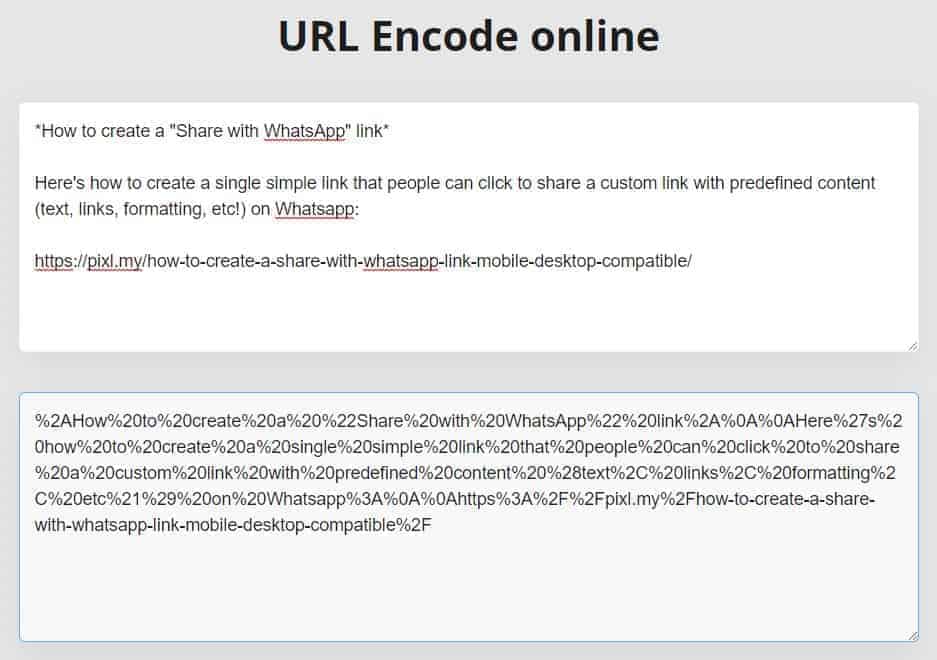
Step 2: Build your link
Once you have your URL-encoded text, paste it into the link code below (replace "URLENCODEDTEXTHERE"):
Option 1: just the link (for pasting into text editors, e.g. WordPress, Mailchimp, Gmail):
https://api.whatsapp.com/send?phone=&text=URLENCODEDTEXTHEREOption 2: the full code (for embedding directly into HTML)
<a href="https://api.whatsapp.com/send?phone=&text=URLENCODEDTEXTHERE">Regular link text here</a>Step 3: Test it
If you did it right, all you need to do is click the link like any regular link. On mobile, this should open the WhatsApp app right away; on desktop, you'll be led to the WhatsApp desktop share interface.
Click here for an example.
The actual link looks like this:
https://api.whatsapp.com/send?phone=&text=%2AHow%20to%20create%20a%20%22Share%20with%20WhatsApp%22%20link%2A%0A%0AHere%27s%20how%20to%20create%20a%20single%20simple%20link%20that%20people%20can%20click%20to%20share%20a%20custom%20link%20with%20predefined%20content%20%28text%2C%20links%2C%20formatting%2C%20etc%21%29%20on%20Whatsapp%3A%0A%0Ahttps%3A%2F%2Fpixl.my%2Fhow-to-create-a-share-with-whatsapp-link-mobile-desktop-compatible%2FI know it looks complicated, but trust me, it gets really easy once you get the hang of it.
Alternatively, you can try chatwith.io – it does something similar, but for one line/paragraph only (no support for multiple lines of text).
Good luck!