How to check folder sizes in Gridpane
Tutorials
For those of us who aren't natural users of the command line, it's frustrating not knowing where all the space is going on your server. Gridpane provides m/monit for a storage usage summary, but it really tells you nothing more than the total used in parent folders... which tells you nothing.
Sometimes, all you want to know is – which website is taking up all that space?
Step 1: SSH into your server via Putty
Sorry mate, if you were looking for a pretty interface... not yet. I'm guessing Gridpane is working on it, but for now you'll still have to do CLI. It's not that hard though – see a quick tutorial here: How to give limited access to developers in Gridpane. Come back here once you've completed Step 5 in that article and logged in as root.
Step 2: Do some digging
From m/monit you should be able to identify the main folders taking up most space.
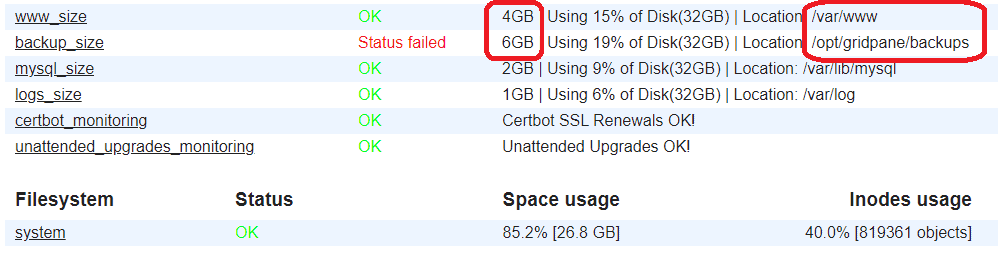
Let's start with /var/www. From Putty, type the following:
cd ./var/wwwcd= change directory.= move within the current folder path/var/www= folder to change to
Then type or copy-paste the command below:
du -h --max-depth=1 | sort -hdu= disk usage-h= human-readable format--max-depth=1= limits the results to one level (otherwise you'll see every subfolder)sort -h= sort by size, largest folder at the bottom
Tip: Ctrl+V doesn't work in Putty. To paste text, right-click your mouse button inside the Putty window.
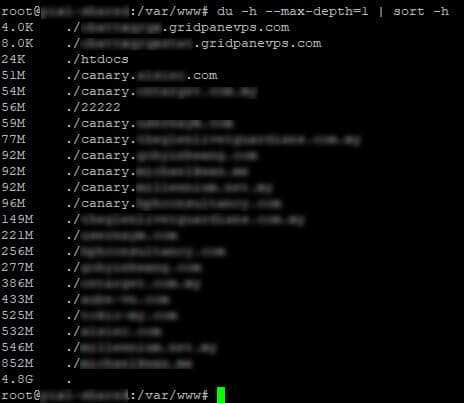
Tada! You now know which site is consuming the most space. Repeat the steps above to dig further and pin down exactly which folder is taking up the extra space. For example:
cd ./superwebsite.com
du -h --max-depth=1 | sort -h
cd ..
cd /opt/gridpane/backup
du -h --max-depth=1 | sort -h
cd ..
cd ~
cd ./superwebsite.com: moves into the subdirectory "superwebsite.com".du -h --max-depth=1 | sort -h: lists each folder and the storage it uses.cd ..: goes up one folder level (mind the space aftercd). You'll end up back in/var/www.cd /opt/gridpane/backup: jumps to the/opt/gridpane/backupfolder.du -h --max-depth=1 | sort -h: lists storage again.cd ..: goes up one level.cd ~: jumps to your home folder (usecd /for the server root).
Repeat as needed. Etc etc etc.
Thanks to this, I found an abandoned Updrafts backup folder (250MB), an unused WP Debug log (1.2GB lol), unused Snapshots (6GB!), and a bunch of other stuff I didn't know about.
For more commands
The Gridpane documentation covers more basic CLI commands, and is where this tutorial came from (technically Tom DeBello answered my question in my support ticket, which resulted in this article, which I wrote for myself as much as for you, haha. So thanks, Tom and the GP team!).
I hope this little tutorial has helped you resolve some of the mysteries in your server. Good luck!
PS – If you have any questions... ask the GP team, lol. I'm nowhere near as capable as those guys.