FIXED: wp_options table is HUGE for no reason!
Announcements
You've cleared revisions, drafts, transients, optimised and repaired your database, NOTHING works and your database still says 10GB for no reason. Sound familiar?
Here's the fix
I did two things at the time, and either one on its own may sort you out:
- phpMyAdmin > wp_options > Operations > Analyze table, or
- Install the WP-Optimize plugin, don't touch anything, just wait 10 minutes.
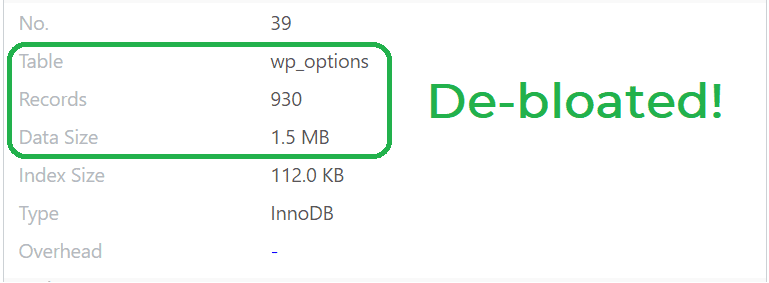
The result should look like this (screenshot taken from the WP-Optimize > Tables screen):
Why did this happen in the first place?
When I first published this post, this section said "honestly I have no idea" and asked readers to write in if they knew. Nobody did, so years later I went digging myself.
The uncomfortable answer: my 10GB table was probably never 10GB. The size phpMyAdmin shows you isn't measured, it's an estimate built from InnoDB's internal statistics, and when those statistics go stale the estimate can be wildly wrong. Analyze table doesn't delete a single row. It just recalculates the statistics, which is why my "10GB" collapsed by 99.994% in about two seconds – the data was never there to begin with.
Genuine wp_options bloat does exist too, mind you. The usual suspects are expired transients that never got cleaned up, and plugins autoloading options they shouldn't. You can check for the real kind with:
SELECT option_name, LENGTH(option_value) AS size
FROM wp_options WHERE autoload='yes'
ORDER BY size DESC LIMIT 20;
If something plugin-shaped is hogging the top of that list, that's real bloat, and WP-Optimize will reclaim the space once you've cleared it out.
Hope this solves it for you. Good luck!